# Release notes
* [Release 25.1 - Q1 2025](#release-25.1-q1-2025)
* [Release 24.4 - Q4 2024](#release-24.4-q4-2024)
* [Release 24.3 - Q3 2024](#release-24.3-q3-2024)
* [Release 24.2 - Q2 2024](#release-24.2-q2-2024)
* [Release 24.1 - Q1 2024](#release-24.1-q1-2024)
***
## Release 25.1 - Q1 2025
**Release Date:** April 7th, 2025
### Release Summary
This release introduces a suite of powerful new features designed to enhance documentation quality, streamline onboarding, and improve visibility into data lineage. Highlights include the introduction of Next-Gen Autolog, allowing to leverage your metadata and code with Ask AI.
### New Features
#### 1. **Next-Gen Autolog**
The Next-Gen Autolog feature significantly enhances the documentation process by combining metadata and code analysis. Powered by **Ask AI**, it automatically organizes logged asset metadata into meaningful sections, analyzes dataset transformations, and generates contextual, insightful commentary. This provides users with richer, more accurate, and context-aware documentation.\
👉 [Next-Gen Autolog](https://docs.vectice.com/25.1/introduction/vectice-overview/next-gen-autolog-beta)
#### 2. **Lineage Diagram Visualization**
Users can now visualize model and dataset lineage with interactive diagrams directly within the Vectice app. The diagrams are fully editable, allowing users to add or remove datasets and models to complete and customize the end-to-end lineage of a project.
Lineage diagram visualization
#### 3. **Revamped onboarding experience**
A completely redesigned onboarding journey is now available, featuring:
* **Quickstart Guide**: Focuses on getting started with Autolog and organizing assets using Ask AI.
* **Interactive Tutorial**: Guides users through the process of creating fully compliant, professional-grade auto-documentation.
This new experience helps users ramp up faster and unlock the full potential of the platform.
#### 4. **Custom styling for reports**
Users now have greater control over report presentation. The editor supports:
* Creation of custom heading styles and paragragh styles
* Selection of various numbering formats
These enhancements allow reports to better align with corporate branding and documentation standards.
Custom styles in the Editor
#### 5. **Versioned permalinks in documentation reports**
Documentation exports (PDF/Word) now include permalinks tied to specific historical versions. Users can rename versions and easily identify which versions have been previously exported. By default, the permalink is displayed in the export footer for clear version tracking and reference.
***
## Release 24.4 - Q4 2024
**Release Date:** January 8, 2025
**Summary:** This release introduces new resource integrations, enhanced user roles, and powerful macro capabilities, alongside updated onboarding resources tailored for specific industries. Key highlights include full support for Snowflake and SparkML, an improved Macro console for report tracking, and expanded browser compatibility.
**New Features:**
1. **Resource** **Integrations**
* **Snowflake resource:** Now fully supported and available through the Vectice API, allowing seamless integration into your workflows.
* **SparkML library:** Supported as part of Vectice Autolog, streamlining the logging process for machine learning projects.
2. **Onboarding** **Enhancements**
* **Banking probability of default model tutorial:** A step-by-step guide showcasing Vectice's capabilities for financial services teams.
3. **Macro** **Console** **and Improvements**
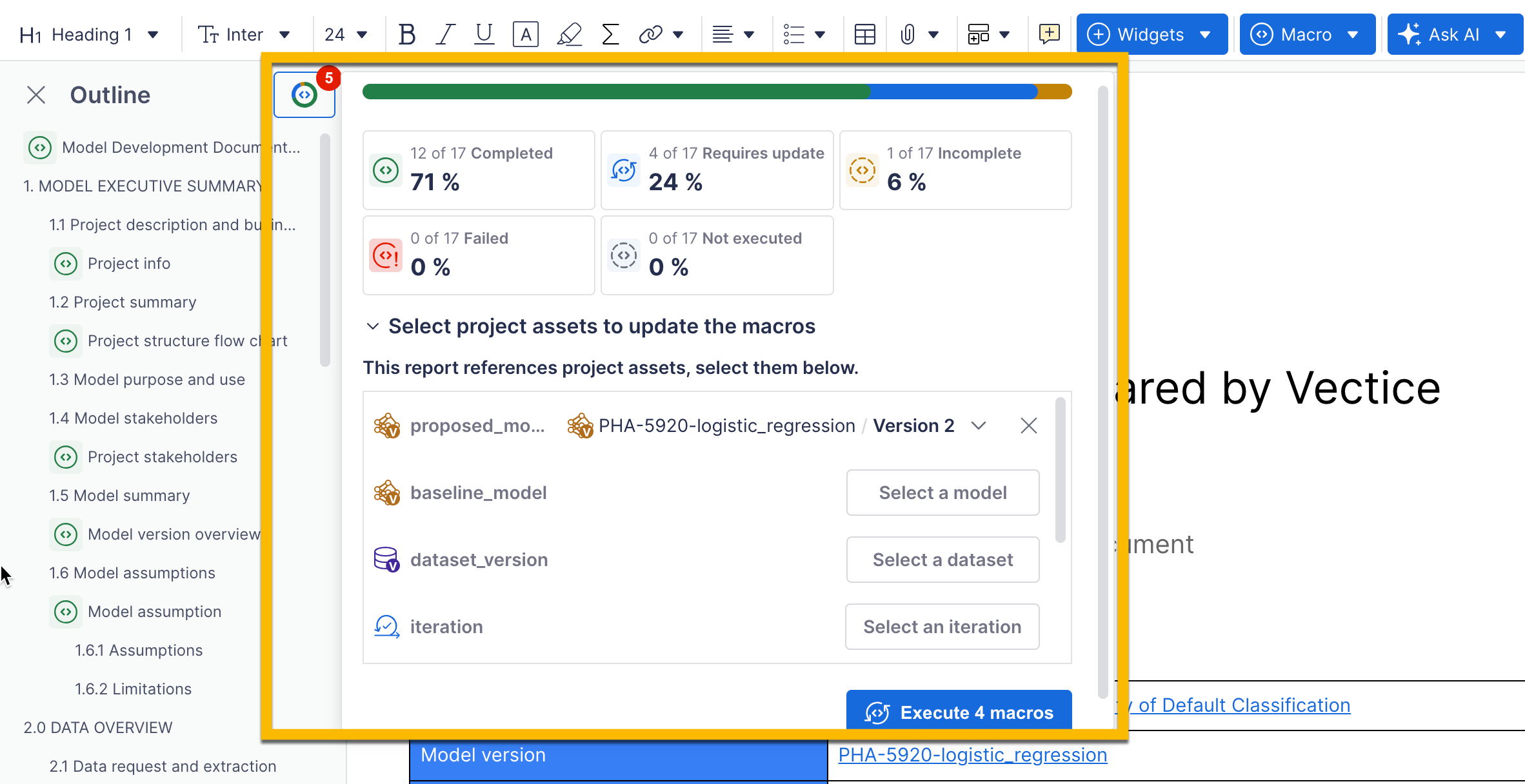
* **Macro status console for reports:**
1. Track the completion status of reports directly in the outline view.
2. Easily select assets to populate reports and make updates—all in one place.
* **Improved macros in Vectice Library:**
1. **Global macros and report templates** for consistent style and formatting across customer organizations provided and maintained by Vectice.
2. **Utility macros** for customizing documents to meet specific organizational needs.
3. **AskAI prompts embedded in macros** for enhanced usability.
4. **Expanded User Roles**
* **Viewer Role:** At the organization level, users can view content, comment, review, and export.
* **Reviewer Role:** At the workspace level, users have the same rights as Viewers, enabling focused collaboration.
5. **Browser Compatibility**
* **Microsoft Edge support:** Edge is now fully supported alongside Chrome and Firefox.
***
## Release 24.3 - Q3 2024
**Release Date:** October 8th, 2024
**Summary:** This release introduces significant enhancements to both the API and UI, enabling more streamlined workflows, enhanced project documentation export capabilities, and user-friendly onboarding. Key highlights include the ability to create projects and phases directly from the API, comprehensive project export functionality, an onboarding tour for new users, improved documentation formatting, and Confluence integration improvements.
**New Features:**
1. **API Enhancements**
* **Create projects and phases directly from the API**\
Users can now create projects and phases from the API without needing to leave their notebook, streamlining the logging of assets into Vectice.
* **Enhanced asset representation via the API**\
Users can retrieve valuable information on assets such as models, datasets, iterations, reports, and reviews directly from the API, ensuring easy access to critical project details.
2. **UI Improvements**
* **Full project documentation export**\
Users can now export the entire project documentation using a pre-defined template, with support for both PDF and Word formats. This ensures professional and consistent reporting.
* **Onboarding tour for new users**\
A new guided onboarding tour has been introduced to help new users navigate the app and get started quickly, ensuring a smooth experience from the very first use.
3. **Vectice Editor Enhancements**
* **Improved formatting capabilities for documentation and reports**\
The editor toolbar has been enhanced with new formatting options, including better table formatting and a table of contents feature, enabling the creation of professional-quality documents.
4. **Integration with Confluence**
* **Seamless document import into Confluence**\
Vectice documents exported as .docx files can now be imported into Confluence without losing formatting or embedded links, simplifying the process of sharing and collaborating on documentation within teams.
5. **Macro Editor Updates**
* **Improved macro editing interface for Admins**\
A new interface for editing macros is available, providing a preview of macro content and in-app help to easily retrieve code, making it easier for Admins to manage and customize macros.
***
## Release 24.2 - Q2 2024
**Release Date:** July 8th, 2024
**Summary:** This release focuses on enhancing our editor to produce high-quality reports and improve LLM features. Key highlights include enhanced formatting capabilities, AskAI improvements, export to Word, updates to lineage, and API enhancements.
**New Features:**
1. **Enhanced formatting capabilities for high-quality reports**
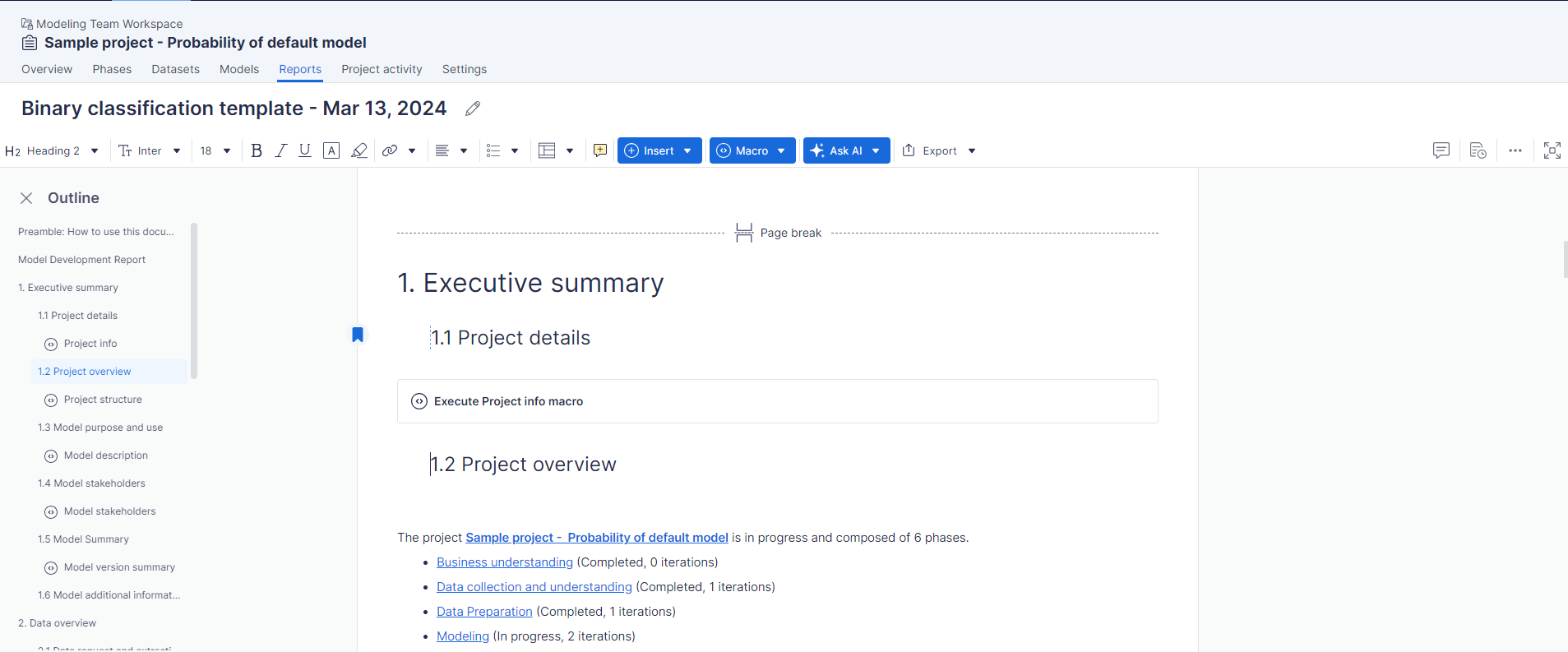
* Customize headers and footers for a professional look
* Easily navigate through your document with an automatic outline
* Add bookmarks for quick access to important sections
2. **AskAI improvements to enhance documentation with smarter AI capabilities**
* Generate detailed documentation effortlessly for a model or dataset.
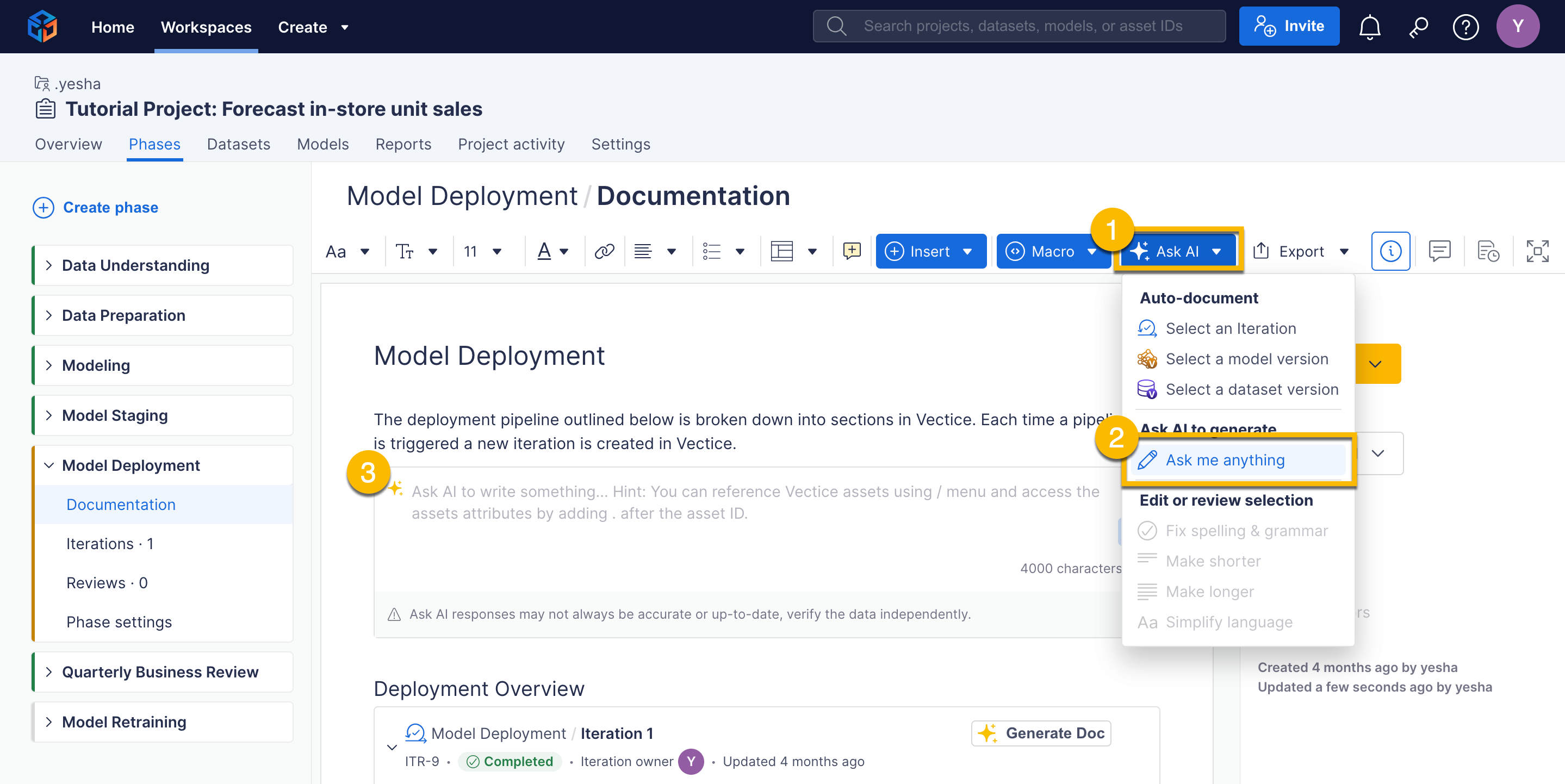
* Seamlessly search for assets and generate documentation with the new / menu
* Enjoy a more intuitive interface with the *Ask Me Anything* feature
3. **Easily export your work to Word format**
* Convert your entire phase or individual reports to Word with ease
4. **Trace the origin of your data for transparency and accuracy**
* Provide evidence of where your data comes from with input dataset documentation
* Document the source of the code used
* Capture and document the code file for reference
5. **Boost your workflow with new API capabilities**
* Integrate Pytorch seamlessly into your projects
* Capture code files automatically with the API
* Pass detailed column descriptions for datasets via the API
***
## Release 24.1 - Q1 2024
**Release Date:** April 22, 2024
**Summary:** This release introduces several powerful new features to enhance your workflow, improve documentation, and facilitate better collaboration. Key highlights include auto-documentation, Autolog, asset organization, Databricks code capture, read-only access for colleagues, and PDF export for documentation.
**New Features:**
1. **Auto-document your models and produce high-quality reports**
* Custom documentation templates / Macros
* Manage templates and macros for specific user profiles
Watch our video for more info: [LINK](https://app.gitbook.com/o/O470i8PLr5LkHCseyQlk/s/bO7GsO4mI4pjZ7XjnzBT/~/changes/274/introduction/vectice-for-financial-services)
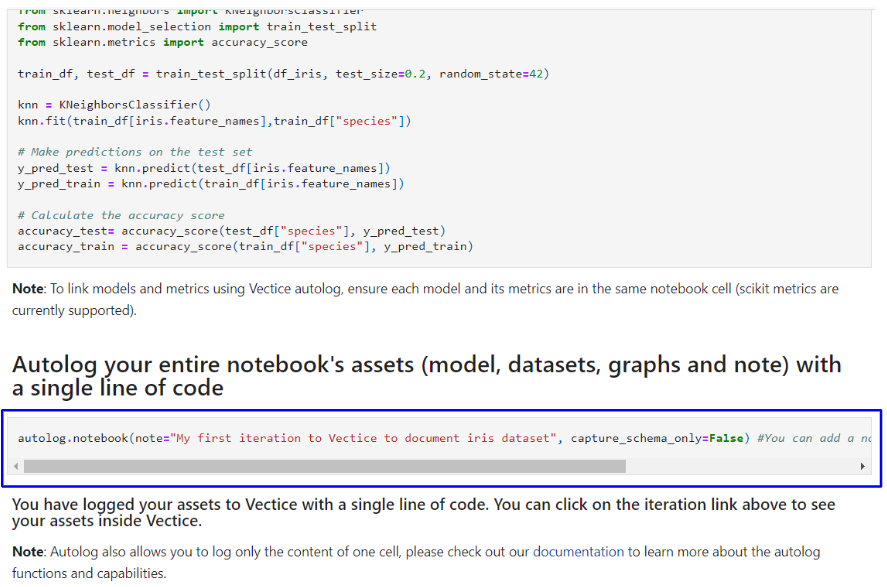
2. **Capture your work with one line of code with Autolog**
* One line of code to capture all your notebook work.
View our API documentation for more info: [LINK](https://api-docs.vectice.com/reference/vectice/autolog/)
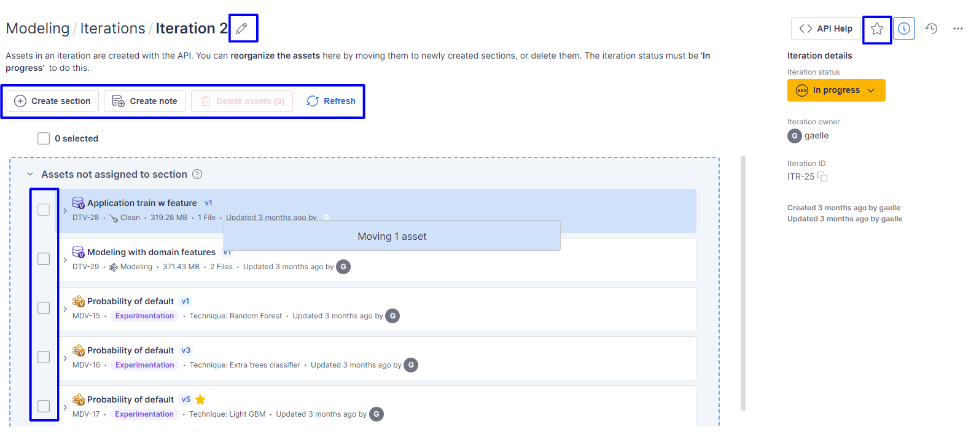
3. **Organize the assets in your iteration to produce better documentation**
* Organize your assets into sections for better auto-documentation.
* Rename iterations, create sections, move assets with drag-and-drop, delete assets, star your iteration, and update the status.
* Add notes to comment on your work.
4. **Capture your code from Databricks**
* Ensure your code is never lost by capturing it in Vectice to complete lineage.
5. **Read-Only Access for Colleagues**
* Introduce the Viewer role at the organization level and Reader roles at the workspace level.
* Ability to read, write comments, review, and export.
* Check our [user management ](https://docs.vectice.com/25.1/admin-guides/user-management)page for more information.
6. **Export your documentation to PDF**
* Export all your documentation to PDF, formatted with header and footer if needed.




.png)